<?xml version="1.0" encoding="iso-8859-1"?><!-- generator="b2evolution/3.3.1" -->
<rdf:RDF xmlns="http://purl.org/rss/1.0/" xmlns:rdf="http://www.w3.org/1999/02/22-rdf-syntax-ns#" xmlns:dc="http://purl.org/dc/elements/1.1/" xmlns:sy="http://purl.org/rss/1.0/modules/syndication/" xmlns:admin="http://webns.net/mvcb/" xmlns:content="http://purl.org/rss/1.0/modules/content/">
<channel rdf:about="http://www.designjetparts.com/blog/index.php?blog=2">
	<title>DesignJet Plotter Repair</title>
	<link>http://www.designjetparts.com/blog/index.php?blog=2</link>
	<description>DesignJet Plotter Repair do it yourself plotter repair information and guides</description>
	<dc:language>en-US</dc:language>
	<admin:generatorAgent rdf:resource="http://b2evolution.net/?v=3.3.1"/>
	<sy:updatePeriod>hourly</sy:updatePeriod>
	<sy:updateFrequency>1</sy:updateFrequency>
	<sy:updateBase>2000-01-01T12:00+00:00</sy:updateBase>
	<items>
		<rdf:Seq>
					<rdf:li rdf:resource="http://www.designjetparts.com/blog/index.php/2018/01/26/replace-the-ink-supply-station-designjet-500-510-and-800?blog=2"/>
					<rdf:li rdf:resource="http://www.designjetparts.com/blog/index.php/2017/10/11/blue-screen-error-designjet-t120-t520-plotter?blog=2"/>
					<rdf:li rdf:resource="http://www.designjetparts.com/blog/index.php/2017/02/06/reinstall-designjet-500-510-800-plotter-encoder-strip?blog=2"/>
					<rdf:li rdf:resource="http://www.designjetparts.com/blog/index.php/2016/10/20/designjet-700-series-printers-noise-along-the-carriage-path?blog=2"/>
					<rdf:li rdf:resource="http://www.designjetparts.com/blog/index.php/2016/01/14/hp_plotter_system_error_2-10?blog=2"/>
					<rdf:li rdf:resource="http://www.designjetparts.com/blog/index.php/2014/06/13/encoder-strip-reinstallation-brackets?blog=2"/>
					<rdf:li rdf:resource="http://www.designjetparts.com/blog/index.php/2014/06/12/designjet-plotter-encoder-strip-errors?blog=2"/>
					<rdf:li rdf:resource="http://www.designjetparts.com/blog/index.php/2014/05/21/mulit-roll-feeder-system-error?blog=2"/>
				</rdf:Seq>
	</items>
</channel>

<item rdf:about="http://www.designjetparts.com/blog/index.php/2018/01/26/replace-the-ink-supply-station-designjet-500-510-and-800?blog=2">
	<title>Replace the Ink Supply Station DesignJet 500, 510 and 800</title>
	<link>http://www.designjetparts.com/blog/index.php/2018/01/26/replace-the-ink-supply-station-designjet-500-510-and-800?blog=2</link>
	<dc:date>2018-01-26T19:50:54Z</dc:date>	<dc:creator>Computer Care</dc:creator>
	<dc:subject>500/510 / 800 Plotter</dc:subject>
		<description>&lt;div class=&quot;socialbutttons&quot;&gt;&lt;div class=&quot;fbiframediv sharebuttton&quot;&gt;&lt;iframe src=&quot;http://www.facebook.com/plugins/like.php?app_id=194259500619894&amp;amp;href=http://www.designjetparts.com/blog/index.php?p=87&amp;amp;send=false&amp;amp;layout=button_count&amp;amp;width=450&amp;amp;show_faces=false&amp;amp;action=like&amp;amp;colorscheme=light&amp;amp;font=arial&amp;amp;height=85&quot; scrolling=&quot;no&quot; frameborder=&quot;0&quot; style=&quot;border:none; overflow:hidden; width:450px; height:85px;&quot; allowTransparency=&quot;true&quot;&gt;&lt;/iframe&gt;&amp;nbsp;&amp;nbsp;&lt;/div&gt;&lt;div class=&quot;twbutton sharebuttton&quot;&gt;&lt;a href=&quot;http://twitter.com/share&quot; class=&quot;twitter-share-button&quot; data-url=&quot;http://www.designjetparts.com/blog/index.php?p=87&quot; data-count=&quot;horizontal&quot; data-via=&quot;@computercareon&quot;&gt;Tweet&lt;/a&gt;&lt;/div&gt;&lt;div class=&quot;gplusdiv sharebuttton&quot;&gt;&lt;g:plusone size=&quot;medium&quot; href=&quot;http://www.designjetparts.com/blog/index.php?p=87&quot;&gt;&lt;/g:plusone&gt;&lt;/div&gt;&lt;/div&gt;&lt;p&gt;&lt;strong&gt;Models Affected DesignJet 500, DesignJet 510, DesignJet 800&lt;/strong&gt;&lt;/p&gt;

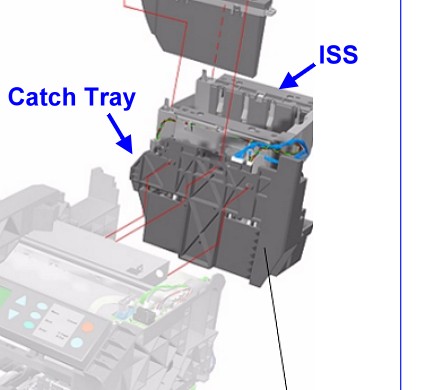
&lt;p&gt;If you have &lt;strong&gt;system error 22:10&lt;/strong&gt; or you are repeatedly getting an &lt;strong&gt;ink cartridge rejection&lt;/strong&gt; or &lt;strong&gt;ink low message&lt;/strong&gt; on the plotters front panel, you may have an ISS issue.&lt;br /&gt;
This could just be dirty contacts or it could be a more serious issue, so first we need to determine which is the case.&lt;/p&gt;
&lt;div class=&quot;image_block&quot;&gt;&lt;a href=&quot;http://www.designjetparts.com/blog/media/blogs/a/withtray.jpg&quot;&gt;&lt;img src=&quot;http://www.designjetparts.com/blog/media/blogs/a/withtray.jpg&quot; alt=&quot;&quot; title=&quot;&quot; width=&quot;425&quot; height=&quot;390&quot; /&gt;&lt;/a&gt;&lt;/div&gt; 

&lt;a href=&quot;http://www.designjetparts.com/blog/index.php/2018/01/26/replace-the-ink-supply-station-designjet-500-510-and-800?blog=2#more87&quot;&gt;Read more &amp;raquo;&lt;/a&gt;&lt;div class=&quot;item_footer&quot;&gt;&lt;p&gt;&lt;small&gt;&lt;a href=&quot;http://www.designjetparts.com/blog/index.php/2018/01/26/replace-the-ink-supply-station-designjet-500-510-and-800?blog=2&quot;&gt;Original post&lt;/a&gt; blogged on &lt;a href=&quot;http://b2evolution.net/&quot;&gt;b2evolution&lt;/a&gt;.&lt;/small&gt;&lt;/p&gt;&lt;/div&gt;</description>
	<content:encoded><![CDATA[<div class="socialbutttons"><div class="fbiframediv sharebuttton"><iframe src="http://www.facebook.com/plugins/like.php?app_id=194259500619894&amp;href=http://www.designjetparts.com/blog/index.php?p=87&amp;send=false&amp;layout=button_count&amp;width=450&amp;show_faces=false&amp;action=like&amp;colorscheme=light&amp;font=arial&amp;height=85" scrolling="no" frameborder="0" style="border:none; overflow:hidden; width:450px; height:85px;" allowTransparency="true"></iframe>&nbsp;&nbsp;</div><div class="twbutton sharebuttton"><a href="http://twitter.com/share" class="twitter-share-button" data-url="http://www.designjetparts.com/blog/index.php?p=87" data-count="horizontal" data-via="@computercareon">Tweet</a></div><div class="gplusdiv sharebuttton"><g:plusone size="medium" href="http://www.designjetparts.com/blog/index.php?p=87"></g:plusone></div></div><p><strong>Models Affected DesignJet 500, DesignJet 510, DesignJet 800</strong></p>

<p>If you have <strong>system error 22:10</strong> or you are repeatedly getting an <strong>ink cartridge rejection</strong> or <strong>ink low message</strong> on the plotters front panel, you may have an ISS issue.<br />
This could just be dirty contacts or it could be a more serious issue, so first we need to determine which is the case.</p>
<div class="image_block"><a href="http://www.designjetparts.com/blog/media/blogs/a/withtray.jpg"><img src="http://www.designjetparts.com/blog/media/blogs/a/withtray.jpg" alt="" title="" width="425" height="390" /></a></div> 

<a href="http://www.designjetparts.com/blog/index.php/2018/01/26/replace-the-ink-supply-station-designjet-500-510-and-800?blog=2#more87">Read more &raquo;</a><div class="item_footer"><p><small><a href="http://www.designjetparts.com/blog/index.php/2018/01/26/replace-the-ink-supply-station-designjet-500-510-and-800?blog=2">Original post</a> blogged on <a href="http://b2evolution.net/">b2evolution</a>.</small></p></div>]]></content:encoded>
			</item>

<item rdf:about="http://www.designjetparts.com/blog/index.php/2017/10/11/blue-screen-error-designjet-t120-t520-plotter?blog=2">
	<title>Blue Screen Error DesignJet T120 T520 Plotter</title>
	<link>http://www.designjetparts.com/blog/index.php/2017/10/11/blue-screen-error-designjet-t120-t520-plotter?blog=2</link>
	<dc:date>2017-10-11T09:44:49Z</dc:date>	<dc:creator>Computer Care</dc:creator>
	<dc:subject>DesignJet How To</dc:subject>
		<description>&lt;div class=&quot;socialbutttons&quot;&gt;&lt;div class=&quot;fbiframediv sharebuttton&quot;&gt;&lt;iframe src=&quot;http://www.facebook.com/plugins/like.php?app_id=194259500619894&amp;amp;href=http://www.designjetparts.com/blog/index.php?p=84&amp;amp;send=false&amp;amp;layout=button_count&amp;amp;width=450&amp;amp;show_faces=false&amp;amp;action=like&amp;amp;colorscheme=light&amp;amp;font=arial&amp;amp;height=85&quot; scrolling=&quot;no&quot; frameborder=&quot;0&quot; style=&quot;border:none; overflow:hidden; width:450px; height:85px;&quot; allowTransparency=&quot;true&quot;&gt;&lt;/iframe&gt;&amp;nbsp;&amp;nbsp;&lt;/div&gt;&lt;div class=&quot;twbutton sharebuttton&quot;&gt;&lt;a href=&quot;http://twitter.com/share&quot; class=&quot;twitter-share-button&quot; data-url=&quot;http://www.designjetparts.com/blog/index.php?p=84&quot; data-count=&quot;horizontal&quot; data-via=&quot;@computercareon&quot;&gt;Tweet&lt;/a&gt;&lt;/div&gt;&lt;div class=&quot;gplusdiv sharebuttton&quot;&gt;&lt;g:plusone size=&quot;medium&quot; href=&quot;http://www.designjetparts.com/blog/index.php?p=84&quot;&gt;&lt;/g:plusone&gt;&lt;/div&gt;&lt;/div&gt;&lt;p&gt;&lt;strong&gt;Windows users are all too familiar with the infamous and notorious Blue Screen of Death or BSOD that spells certain headaches and time for a computer user.&lt;/strong&gt;&lt;/p&gt;
&lt;div class=&quot;image_block&quot;&gt;&lt;a href=&quot;http://www.designjetparts.com/blog/media/blogs/a/cq890-67105/hp-designjet-t120-01.jpg&quot;&gt;&lt;img src=&quot;http://www.designjetparts.com/blog/media/blogs/a/cq890-67105/hp-designjet-t120-01.jpg&quot; alt=&quot;Blue Screen Error DesignJet T120 T520 Plotter&quot; title=&quot;Blue Screen Error DesignJet T120 T520 Plotter&quot; width=&quot;450&quot; /&gt;&lt;/a&gt;&lt;/div&gt;&lt;p&gt; &lt;br /&gt;
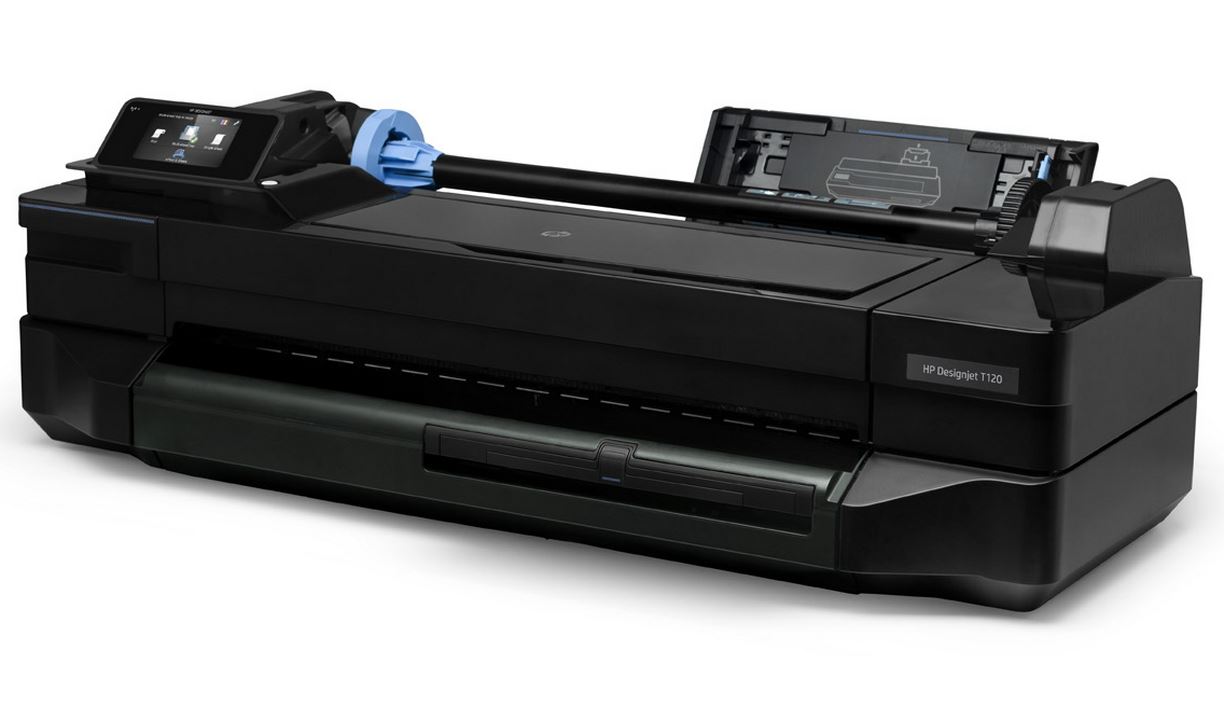
What to do if you turn on your HP DesignJet T120 or DesignJet T520 Plotter and it has a Blue Screen of Death, with a System Error Code of 83C0000B or 00541654 (there are others)?&lt;/p&gt;

&lt;a href=&quot;http://www.designjetparts.com/blog/index.php/2017/10/11/blue-screen-error-designjet-t120-t520-plotter?blog=2#more84&quot;&gt;Read more &amp;raquo;&lt;/a&gt;&lt;div class=&quot;item_footer&quot;&gt;&lt;p&gt;&lt;small&gt;&lt;a href=&quot;http://www.designjetparts.com/blog/index.php/2017/10/11/blue-screen-error-designjet-t120-t520-plotter?blog=2&quot;&gt;Original post&lt;/a&gt; blogged on &lt;a href=&quot;http://b2evolution.net/&quot;&gt;b2evolution&lt;/a&gt;.&lt;/small&gt;&lt;/p&gt;&lt;/div&gt;</description>
	<content:encoded><![CDATA[<div class="socialbutttons"><div class="fbiframediv sharebuttton"><iframe src="http://www.facebook.com/plugins/like.php?app_id=194259500619894&amp;href=http://www.designjetparts.com/blog/index.php?p=84&amp;send=false&amp;layout=button_count&amp;width=450&amp;show_faces=false&amp;action=like&amp;colorscheme=light&amp;font=arial&amp;height=85" scrolling="no" frameborder="0" style="border:none; overflow:hidden; width:450px; height:85px;" allowTransparency="true"></iframe>&nbsp;&nbsp;</div><div class="twbutton sharebuttton"><a href="http://twitter.com/share" class="twitter-share-button" data-url="http://www.designjetparts.com/blog/index.php?p=84" data-count="horizontal" data-via="@computercareon">Tweet</a></div><div class="gplusdiv sharebuttton"><g:plusone size="medium" href="http://www.designjetparts.com/blog/index.php?p=84"></g:plusone></div></div><p><strong>Windows users are all too familiar with the infamous and notorious Blue Screen of Death or BSOD that spells certain headaches and time for a computer user.</strong></p>
<div class="image_block"><a href="http://www.designjetparts.com/blog/media/blogs/a/cq890-67105/hp-designjet-t120-01.jpg"><img src="http://www.designjetparts.com/blog/media/blogs/a/cq890-67105/hp-designjet-t120-01.jpg" alt="Blue Screen Error DesignJet T120 T520 Plotter" title="Blue Screen Error DesignJet T120 T520 Plotter" width="450" /></a></div><p> <br />
What to do if you turn on your HP DesignJet T120 or DesignJet T520 Plotter and it has a Blue Screen of Death, with a System Error Code of 83C0000B or 00541654 (there are others)?</p>

<a href="http://www.designjetparts.com/blog/index.php/2017/10/11/blue-screen-error-designjet-t120-t520-plotter?blog=2#more84">Read more &raquo;</a><div class="item_footer"><p><small><a href="http://www.designjetparts.com/blog/index.php/2017/10/11/blue-screen-error-designjet-t120-t520-plotter?blog=2">Original post</a> blogged on <a href="http://b2evolution.net/">b2evolution</a>.</small></p></div>]]></content:encoded>
			</item>

<item rdf:about="http://www.designjetparts.com/blog/index.php/2017/02/06/reinstall-designjet-500-510-800-plotter-encoder-strip?blog=2">
	<title>Reinstall DesignJet 500 / 510 / 800 Plotter Encoder Strip</title>
	<link>http://www.designjetparts.com/blog/index.php/2017/02/06/reinstall-designjet-500-510-800-plotter-encoder-strip?blog=2</link>
	<dc:date>2017-02-06T09:00:08Z</dc:date>	<dc:creator>Computer Care</dc:creator>
	<dc:subject>DesignJet How To</dc:subject>
		<description>&lt;div class=&quot;socialbutttons&quot;&gt;&lt;div class=&quot;fbiframediv sharebuttton&quot;&gt;&lt;iframe src=&quot;http://www.facebook.com/plugins/like.php?app_id=194259500619894&amp;amp;href=http://www.designjetparts.com/blog/index.php?p=76&amp;amp;send=false&amp;amp;layout=button_count&amp;amp;width=450&amp;amp;show_faces=false&amp;amp;action=like&amp;amp;colorscheme=light&amp;amp;font=arial&amp;amp;height=85&quot; scrolling=&quot;no&quot; frameborder=&quot;0&quot; style=&quot;border:none; overflow:hidden; width:450px; height:85px;&quot; allowTransparency=&quot;true&quot;&gt;&lt;/iframe&gt;&amp;nbsp;&amp;nbsp;&lt;/div&gt;&lt;div class=&quot;twbutton sharebuttton&quot;&gt;&lt;a href=&quot;http://twitter.com/share&quot; class=&quot;twitter-share-button&quot; data-url=&quot;http://www.designjetparts.com/blog/index.php?p=76&quot; data-count=&quot;horizontal&quot; data-via=&quot;@computercareon&quot;&gt;Tweet&lt;/a&gt;&lt;/div&gt;&lt;div class=&quot;gplusdiv sharebuttton&quot;&gt;&lt;g:plusone size=&quot;medium&quot; href=&quot;http://www.designjetparts.com/blog/index.php?p=76&quot;&gt;&lt;/g:plusone&gt;&lt;/div&gt;&lt;/div&gt;&lt;p&gt;&lt;/p&gt;
&lt;p&gt;&lt;br /&gt;&lt;br /&gt;
&lt;strong&gt;Due to questions called into our shop over the years of the exact location and orientation of the Encoder Strip on the HP DesignJet 500 / 510 / 800 plotter models; we thought it was time to post some tips and photos to help you with the correct placement and orientation of the &lt;a href=&quot;http://www.computercareonline.com/designjet-parts-by-type-c-193.html&quot;target=_blank&gt;Encoder Strip&lt;/a&gt; during the install.&lt;/strong&gt;&lt;/p&gt;

&lt;p&gt;Follow the &lt;a href=&quot;http://www.computercareonline.com/documents.php&quot;target=_blank&gt;replacement instructions on page 8-76 of the Remove and Replace chapter&lt;/a&gt; of the &lt;a href=&quot;http://www.computercareonline.com/designjet-service-and-repair-manuals-p-605.html&quot;target=_blank&gt;Service Manual&lt;/a&gt;.&lt;/p&gt;

&lt;p&gt;Here is what they don't seem to tell you.&lt;/p&gt;

&lt;a href=&quot;http://www.designjetparts.com/blog/index.php/2017/02/06/reinstall-designjet-500-510-800-plotter-encoder-strip?blog=2#more76&quot;&gt;Read more &amp;raquo;&lt;/a&gt;&lt;div class=&quot;item_footer&quot;&gt;&lt;p&gt;&lt;small&gt;&lt;a href=&quot;http://www.designjetparts.com/blog/index.php/2017/02/06/reinstall-designjet-500-510-800-plotter-encoder-strip?blog=2&quot;&gt;Original post&lt;/a&gt; blogged on &lt;a href=&quot;http://b2evolution.net/&quot;&gt;b2evolution&lt;/a&gt;.&lt;/small&gt;&lt;/p&gt;&lt;/div&gt;</description>
	<content:encoded><![CDATA[<div class="socialbutttons"><div class="fbiframediv sharebuttton"><iframe src="http://www.facebook.com/plugins/like.php?app_id=194259500619894&amp;href=http://www.designjetparts.com/blog/index.php?p=76&amp;send=false&amp;layout=button_count&amp;width=450&amp;show_faces=false&amp;action=like&amp;colorscheme=light&amp;font=arial&amp;height=85" scrolling="no" frameborder="0" style="border:none; overflow:hidden; width:450px; height:85px;" allowTransparency="true"></iframe>&nbsp;&nbsp;</div><div class="twbutton sharebuttton"><a href="http://twitter.com/share" class="twitter-share-button" data-url="http://www.designjetparts.com/blog/index.php?p=76" data-count="horizontal" data-via="@computercareon">Tweet</a></div><div class="gplusdiv sharebuttton"><g:plusone size="medium" href="http://www.designjetparts.com/blog/index.php?p=76"></g:plusone></div></div><p></p>
<p><br /><br />
<strong>Due to questions called into our shop over the years of the exact location and orientation of the Encoder Strip on the HP DesignJet 500 / 510 / 800 plotter models; we thought it was time to post some tips and photos to help you with the correct placement and orientation of the <a href="http://www.computercareonline.com/designjet-parts-by-type-c-193.html"target=_blank>Encoder Strip</a> during the install.</strong></p>

<p>Follow the <a href="http://www.computercareonline.com/documents.php"target=_blank>replacement instructions on page 8-76 of the Remove and Replace chapter</a> of the <a href="http://www.computercareonline.com/designjet-service-and-repair-manuals-p-605.html"target=_blank>Service Manual</a>.</p>

<p>Here is what they don't seem to tell you.</p>

<a href="http://www.designjetparts.com/blog/index.php/2017/02/06/reinstall-designjet-500-510-800-plotter-encoder-strip?blog=2#more76">Read more &raquo;</a><div class="item_footer"><p><small><a href="http://www.designjetparts.com/blog/index.php/2017/02/06/reinstall-designjet-500-510-800-plotter-encoder-strip?blog=2">Original post</a> blogged on <a href="http://b2evolution.net/">b2evolution</a>.</small></p></div>]]></content:encoded>
			</item>

<item rdf:about="http://www.designjetparts.com/blog/index.php/2016/10/20/designjet-700-series-printers-noise-along-the-carriage-path?blog=2">
	<title>Designjet 700 Series Printers - Noise Along the Carriage Path</title>
	<link>http://www.designjetparts.com/blog/index.php/2016/10/20/designjet-700-series-printers-noise-along-the-carriage-path?blog=2</link>
	<dc:date>2016-10-20T08:23:09Z</dc:date>	<dc:creator>Computer Care</dc:creator>
	<dc:subject>DesignJet How To</dc:subject>
		<description>&lt;p&gt;&lt;a href=&quot;http://www.computercarefiles.com/TWI_Docs/bpp90058/default.html&quot;&gt;http://www.computercarefiles.com/TWI_Docs/bpp90058/default.html&lt;/a&gt;&lt;/p&gt;&lt;div class=&quot;socialbutttons&quot;&gt;&lt;div class=&quot;fbiframediv sharebuttton&quot;&gt;&lt;iframe src=&quot;http://www.facebook.com/plugins/like.php?app_id=194259500619894&amp;amp;href=http://www.designjetparts.com/blog/index.php?p=75&amp;amp;send=false&amp;amp;layout=button_count&amp;amp;width=450&amp;amp;show_faces=false&amp;amp;action=like&amp;amp;colorscheme=light&amp;amp;font=arial&amp;amp;height=85&quot; scrolling=&quot;no&quot; frameborder=&quot;0&quot; style=&quot;border:none; overflow:hidden; width:450px; height:85px;&quot; allowTransparency=&quot;true&quot;&gt;&lt;/iframe&gt;&amp;nbsp;&amp;nbsp;&lt;/div&gt;&lt;div class=&quot;twbutton sharebuttton&quot;&gt;&lt;a href=&quot;http://twitter.com/share&quot; class=&quot;twitter-share-button&quot; data-url=&quot;http://www.designjetparts.com/blog/index.php?p=75&quot; data-count=&quot;horizontal&quot; data-via=&quot;@computercareon&quot;&gt;Tweet&lt;/a&gt;&lt;/div&gt;&lt;div class=&quot;gplusdiv sharebuttton&quot;&gt;&lt;g:plusone size=&quot;medium&quot; href=&quot;http://www.designjetparts.com/blog/index.php?p=75&quot;&gt;&lt;/g:plusone&gt;&lt;/div&gt;&lt;/div&gt;&lt;p&gt;&lt;strong&gt;HP Designjet 700 Series Printers - Noise Along the Carriage Path, General Y-Axis Troubleshooting&lt;/strong&gt;&lt;/p&gt;


&lt;p&gt;&lt;img src=&quot;/blog/media/blogs/a/DesignJet_750.jpg&quot; width=&quot;85%&quot; alt=&quot;Designjet 700 Series Printers - Noise Along the Carriage Path.&quot; /&gt;&lt;/p&gt;

&lt;p&gt;&lt;strong&gt;Noise is produced when the pen carriage cannot move freely.&lt;/strong&gt; &lt;br /&gt;
Common causes are the &lt;a href=&quot;http://www.computercareonline.com/carriage-belt-c-193_194.html&quot;target=_blank&gt;Y-belt (carriage belt)&lt;/a&gt; being frayed or worn, obstructions or excess friction along the carriage path, the &lt;a href=&quot;http://www.computercareonline.com/cutter-c-193_199.html&quot;target=_blank&gt;cutter&lt;/a&gt; failing to reach its home position, or worn or damaged Y-axis parts. Follow the instructions listed below to help solve these errors.&lt;/p&gt;

&lt;a href=&quot;http://www.designjetparts.com/blog/index.php/2016/10/20/designjet-700-series-printers-noise-along-the-carriage-path?blog=2#more75&quot;&gt;Read more &amp;raquo;&lt;/a&gt;&lt;div class=&quot;item_footer&quot;&gt;&lt;p&gt;&lt;small&gt;&lt;a href=&quot;http://www.designjetparts.com/blog/index.php/2016/10/20/designjet-700-series-printers-noise-along-the-carriage-path?blog=2&quot;&gt;Original post&lt;/a&gt; blogged on &lt;a href=&quot;http://b2evolution.net/&quot;&gt;b2evolution&lt;/a&gt;.&lt;/small&gt;&lt;/p&gt;&lt;/div&gt;</description>
	<content:encoded><![CDATA[<p><a href="http://www.computercarefiles.com/TWI_Docs/bpp90058/default.html">http://www.computercarefiles.com/TWI_Docs/bpp90058/default.html</a></p><div class="socialbutttons"><div class="fbiframediv sharebuttton"><iframe src="http://www.facebook.com/plugins/like.php?app_id=194259500619894&amp;href=http://www.designjetparts.com/blog/index.php?p=75&amp;send=false&amp;layout=button_count&amp;width=450&amp;show_faces=false&amp;action=like&amp;colorscheme=light&amp;font=arial&amp;height=85" scrolling="no" frameborder="0" style="border:none; overflow:hidden; width:450px; height:85px;" allowTransparency="true"></iframe>&nbsp;&nbsp;</div><div class="twbutton sharebuttton"><a href="http://twitter.com/share" class="twitter-share-button" data-url="http://www.designjetparts.com/blog/index.php?p=75" data-count="horizontal" data-via="@computercareon">Tweet</a></div><div class="gplusdiv sharebuttton"><g:plusone size="medium" href="http://www.designjetparts.com/blog/index.php?p=75"></g:plusone></div></div><p><strong>HP Designjet 700 Series Printers - Noise Along the Carriage Path, General Y-Axis Troubleshooting</strong></p>


<p><img src="http://www.designjetparts.com/blog/media/blogs/a/DesignJet_750.jpg" width="85%" alt="Designjet 700 Series Printers - Noise Along the Carriage Path." /></p>

<p><strong>Noise is produced when the pen carriage cannot move freely.</strong> <br />
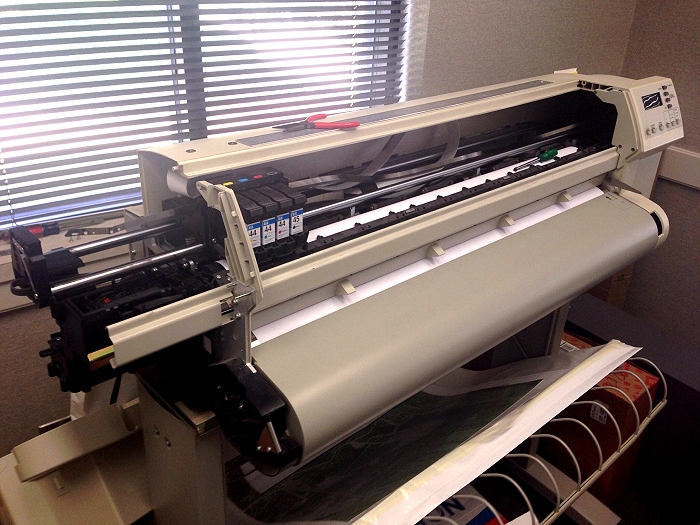
Common causes are the <a href="http://www.computercareonline.com/carriage-belt-c-193_194.html"target=_blank>Y-belt (carriage belt)</a> being frayed or worn, obstructions or excess friction along the carriage path, the <a href="http://www.computercareonline.com/cutter-c-193_199.html"target=_blank>cutter</a> failing to reach its home position, or worn or damaged Y-axis parts. Follow the instructions listed below to help solve these errors.</p>

<a href="http://www.designjetparts.com/blog/index.php/2016/10/20/designjet-700-series-printers-noise-along-the-carriage-path?blog=2#more75">Read more &raquo;</a><div class="item_footer"><p><small><a href="http://www.designjetparts.com/blog/index.php/2016/10/20/designjet-700-series-printers-noise-along-the-carriage-path?blog=2">Original post</a> blogged on <a href="http://b2evolution.net/">b2evolution</a>.</small></p></div>]]></content:encoded>
			</item>

<item rdf:about="http://www.designjetparts.com/blog/index.php/2016/01/14/hp_plotter_system_error_2-10?blog=2">
	<title>DesignJet 500 / 510 / 800 HP Plotter, System Error 2:10</title>
	<link>http://www.designjetparts.com/blog/index.php/2016/01/14/hp_plotter_system_error_2-10?blog=2</link>
	<dc:date>2016-01-14T08:28:21Z</dc:date>	<dc:creator>Computer Care</dc:creator>
	<dc:subject>DesignJet 510 Plotter</dc:subject>
		<description>&lt;div class=&quot;socialbutttons&quot;&gt;&lt;div class=&quot;fbiframediv sharebuttton&quot;&gt;&lt;iframe src=&quot;http://www.facebook.com/plugins/like.php?app_id=194259500619894&amp;amp;href=http://www.designjetparts.com/blog/index.php?p=72&amp;amp;send=false&amp;amp;layout=button_count&amp;amp;width=450&amp;amp;show_faces=false&amp;amp;action=like&amp;amp;colorscheme=light&amp;amp;font=arial&amp;amp;height=85&quot; scrolling=&quot;no&quot; frameborder=&quot;0&quot; style=&quot;border:none; overflow:hidden; width:450px; height:85px;&quot; allowTransparency=&quot;true&quot;&gt;&lt;/iframe&gt;&amp;nbsp;&amp;nbsp;&lt;/div&gt;&lt;div class=&quot;twbutton sharebuttton&quot;&gt;&lt;a href=&quot;http://twitter.com/share&quot; class=&quot;twitter-share-button&quot; data-url=&quot;http://www.designjetparts.com/blog/index.php?p=72&quot; data-count=&quot;horizontal&quot; data-via=&quot;@computercareon&quot;&gt;Tweet&lt;/a&gt;&lt;/div&gt;&lt;div class=&quot;gplusdiv sharebuttton&quot;&gt;&lt;g:plusone size=&quot;medium&quot; href=&quot;http://www.designjetparts.com/blog/index.php?p=72&quot;&gt;&lt;/g:plusone&gt;&lt;/div&gt;&lt;/div&gt;&lt;p&gt;&lt;strong&gt;DesignJet 500 / 510 / 800 HP Plotter, System Error 2:10&lt;/strong&gt;&lt;/p&gt;

&lt;p&gt;&lt;img src=&quot;/blog/media/blogs/a/2015-12-28-DJ-510.jpg&quot; width=&quot;85%&quot; alt=&quot;Repairing a system error 2:10 on a DesignJet 510 42 inch wide format plotter printer.&quot; /&gt;&lt;/p&gt;

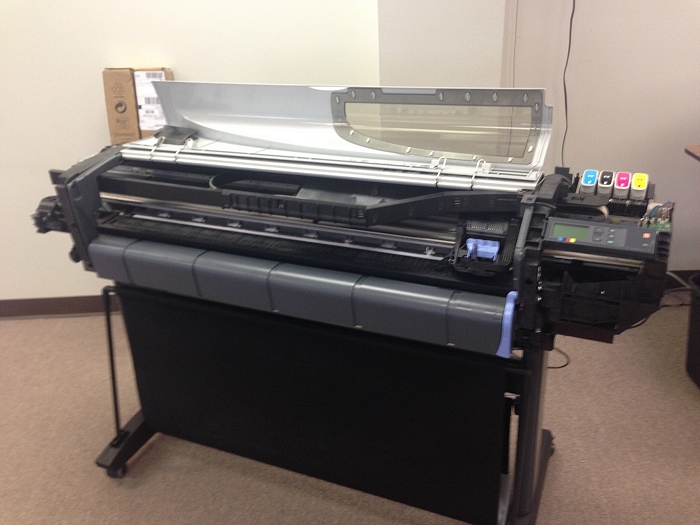
&lt;p&gt;According to documentation and experience this error us usually caused by a malfunction in the carriage assembly. &lt;br /&gt;
 HP describes it as:&lt;/p&gt;
&lt;blockquote&gt;&lt;p&gt;Carriage failure. The possible cause could be:&lt;br /&gt;
1. The Carriage PCA is not compatible with the rest of the Printer.&lt;br /&gt;
2. The Carriage ASIC has problems initializing.&lt;br /&gt;
3. The +2.5V reference voltage generated in the Carriage PCA is&lt;br /&gt;
out of range.&lt;br /&gt;
4. One of the Carriage ASIC&amp;#226;&amp;#8364;&amp;#8482;s cannot be found within the Serial&lt;br /&gt;
Bus that connects the Electronics Module to the Carriage.&lt;br /&gt;
5. One of the Carriage ASIC&amp;#226;&amp;#8364;&amp;#8482;s did not respond to the Serial Bus that&lt;br /&gt;
connects the Electronics Module to the Carriage Assembly.&lt;/p&gt;&lt;/blockquote&gt;

&lt;a href=&quot;http://www.designjetparts.com/blog/index.php/2016/01/14/hp_plotter_system_error_2-10?blog=2#more72&quot;&gt;Read more &amp;raquo;&lt;/a&gt;&lt;div class=&quot;item_footer&quot;&gt;&lt;p&gt;&lt;small&gt;&lt;a href=&quot;http://www.designjetparts.com/blog/index.php/2016/01/14/hp_plotter_system_error_2-10?blog=2&quot;&gt;Original post&lt;/a&gt; blogged on &lt;a href=&quot;http://b2evolution.net/&quot;&gt;b2evolution&lt;/a&gt;.&lt;/small&gt;&lt;/p&gt;&lt;/div&gt;</description>
	<content:encoded><![CDATA[<div class="socialbutttons"><div class="fbiframediv sharebuttton"><iframe src="http://www.facebook.com/plugins/like.php?app_id=194259500619894&amp;href=http://www.designjetparts.com/blog/index.php?p=72&amp;send=false&amp;layout=button_count&amp;width=450&amp;show_faces=false&amp;action=like&amp;colorscheme=light&amp;font=arial&amp;height=85" scrolling="no" frameborder="0" style="border:none; overflow:hidden; width:450px; height:85px;" allowTransparency="true"></iframe>&nbsp;&nbsp;</div><div class="twbutton sharebuttton"><a href="http://twitter.com/share" class="twitter-share-button" data-url="http://www.designjetparts.com/blog/index.php?p=72" data-count="horizontal" data-via="@computercareon">Tweet</a></div><div class="gplusdiv sharebuttton"><g:plusone size="medium" href="http://www.designjetparts.com/blog/index.php?p=72"></g:plusone></div></div><p><strong>DesignJet 500 / 510 / 800 HP Plotter, System Error 2:10</strong></p>

<p><img src="http://www.designjetparts.com/blog/media/blogs/a/2015-12-28-DJ-510.jpg" width="85%" alt="Repairing a system error 2:10 on a DesignJet 510 42 inch wide format plotter printer." /></p>

<p>According to documentation and experience this error us usually caused by a malfunction in the carriage assembly. <br />
 HP describes it as:</p>
<blockquote><p>Carriage failure. The possible cause could be:<br />
1. The Carriage PCA is not compatible with the rest of the Printer.<br />
2. The Carriage ASIC has problems initializing.<br />
3. The +2.5V reference voltage generated in the Carriage PCA is<br />
out of range.<br />
4. One of the Carriage ASIC&#226;&#8364;&#8482;s cannot be found within the Serial<br />
Bus that connects the Electronics Module to the Carriage.<br />
5. One of the Carriage ASIC&#226;&#8364;&#8482;s did not respond to the Serial Bus that<br />
connects the Electronics Module to the Carriage Assembly.</p></blockquote>

<a href="http://www.designjetparts.com/blog/index.php/2016/01/14/hp_plotter_system_error_2-10?blog=2#more72">Read more &raquo;</a><div class="item_footer"><p><small><a href="http://www.designjetparts.com/blog/index.php/2016/01/14/hp_plotter_system_error_2-10?blog=2">Original post</a> blogged on <a href="http://b2evolution.net/">b2evolution</a>.</small></p></div>]]></content:encoded>
			</item>

<item rdf:about="http://www.designjetparts.com/blog/index.php/2014/06/13/encoder-strip-reinstallation-brackets?blog=2">
	<title>Reinstalling The Encoder Strip DesignJet 500 / 800 Plotter models</title>
	<link>http://www.designjetparts.com/blog/index.php/2014/06/13/encoder-strip-reinstallation-brackets?blog=2</link>
	<dc:date>2014-06-13T08:31:32Z</dc:date>	<dc:creator>Computer Care</dc:creator>
	<dc:subject>DesignJet How To</dc:subject>
		<description>&lt;div class=&quot;socialbutttons&quot;&gt;&lt;div class=&quot;fbiframediv sharebuttton&quot;&gt;&lt;iframe src=&quot;http://www.facebook.com/plugins/like.php?app_id=194259500619894&amp;amp;href=http://www.designjetparts.com/blog/index.php?p=65&amp;amp;send=false&amp;amp;layout=button_count&amp;amp;width=450&amp;amp;show_faces=false&amp;amp;action=like&amp;amp;colorscheme=light&amp;amp;font=arial&amp;amp;height=85&quot; scrolling=&quot;no&quot; frameborder=&quot;0&quot; style=&quot;border:none; overflow:hidden; width:450px; height:85px;&quot; allowTransparency=&quot;true&quot;&gt;&lt;/iframe&gt;&amp;nbsp;&amp;nbsp;&lt;/div&gt;&lt;div class=&quot;twbutton sharebuttton&quot;&gt;&lt;a href=&quot;http://twitter.com/share&quot; class=&quot;twitter-share-button&quot; data-url=&quot;http://www.designjetparts.com/blog/index.php?p=65&quot; data-count=&quot;horizontal&quot; data-via=&quot;@computercareon&quot;&gt;Tweet&lt;/a&gt;&lt;/div&gt;&lt;div class=&quot;gplusdiv sharebuttton&quot;&gt;&lt;g:plusone size=&quot;medium&quot; href=&quot;http://www.designjetparts.com/blog/index.php?p=65&quot;&gt;&lt;/g:plusone&gt;&lt;/div&gt;&lt;/div&gt;&lt;p&gt;&lt;strong&gt;Reinstalling the &lt;a href=&quot;http://www.computercareonline.com/encoder-strip-c-193_195.html&quot; target=&quot;_blank&quot;&gt; encoder strip&lt;/a&gt; into the service station bracket on the right
end of a &lt;a href=&quot;http://www.computercareonline.com/designjet-500-c-67_104.html&quot; target=&quot;_blank&quot;&gt; DesignJet 500&lt;/a&gt; &lt;a href=&quot;http://www.computercareonline.com/designjet-510-c-67_202.html&quot;target=&quot;_blank&quot;&gt; DesignJet 510&lt;/a&gt; and 
&lt;a href=&quot;http://www.computercareonline.com/designjet-800-c-67_106.html&quot; target=&quot;_blank&quot;&gt; DesignJet 800&lt;/a&gt; plotter can be a bit tricky&lt;/strong&gt;.&lt;br /&gt;But
with the Service Manual and a few photos it is actually an easy task to accomplish.&amp;nbsp;&lt;br /&gt;&lt;strong&gt;Parts
involved&lt;/strong&gt;:&lt;br /&gt;&lt;a href=&quot;http://www.computercareonline.com/c7769-60156-c7769-60391-designjet-500-800-service-station-bracket-p-430.html&quot; target=&quot;_blank&quot;&gt;Service Station Bracket C7769-60156 aka C7769-60391&lt;/a&gt;&lt;br /&gt;&lt;a href=&quot;http://www.computercareonline.com/c7769-60183-designjet-500-800-encoder-strip-24-inch-plotter-p-452.html&quot; target=&quot;_blank&quot;&gt;Encoder
Strip for 24 inch plotter models C7769-60183&lt;/a&gt;&lt;br /&gt;&lt;a href=&quot;http://www.computercareonline.com/c7770-60013-designjet-500-800-encoder-strip-42-inch-p-32.html&quot; target=&quot;_blank&quot;&gt;Encoder Strip for 42 inch
plotter models C7770-60013&lt;/a&gt;&lt;/p&gt;
&lt;p&gt;&lt;strong&gt;So here are a few figures and instructions to help you on your way&lt;/strong&gt;.&lt;/p&gt;
&lt;a href=&quot;http://www.designjetparts.com/blog/index.php/2014/06/13/encoder-strip-reinstallation-brackets?blog=2#more65&quot;&gt;Read more &amp;raquo;&lt;/a&gt;&lt;div class=&quot;item_footer&quot;&gt;&lt;p&gt;&lt;small&gt;&lt;a href=&quot;http://www.designjetparts.com/blog/index.php/2014/06/13/encoder-strip-reinstallation-brackets?blog=2&quot;&gt;Original post&lt;/a&gt; blogged on &lt;a href=&quot;http://b2evolution.net/&quot;&gt;b2evolution&lt;/a&gt;.&lt;/small&gt;&lt;/p&gt;&lt;/div&gt;</description>
	<content:encoded><![CDATA[<div class="socialbutttons"><div class="fbiframediv sharebuttton"><iframe src="http://www.facebook.com/plugins/like.php?app_id=194259500619894&amp;href=http://www.designjetparts.com/blog/index.php?p=65&amp;send=false&amp;layout=button_count&amp;width=450&amp;show_faces=false&amp;action=like&amp;colorscheme=light&amp;font=arial&amp;height=85" scrolling="no" frameborder="0" style="border:none; overflow:hidden; width:450px; height:85px;" allowTransparency="true"></iframe>&nbsp;&nbsp;</div><div class="twbutton sharebuttton"><a href="http://twitter.com/share" class="twitter-share-button" data-url="http://www.designjetparts.com/blog/index.php?p=65" data-count="horizontal" data-via="@computercareon">Tweet</a></div><div class="gplusdiv sharebuttton"><g:plusone size="medium" href="http://www.designjetparts.com/blog/index.php?p=65"></g:plusone></div></div><p><strong>Reinstalling the <a href="http://www.computercareonline.com/encoder-strip-c-193_195.html" target="_blank"> encoder strip</a> into the service station bracket on the right
end of a <a href="http://www.computercareonline.com/designjet-500-c-67_104.html" target="_blank"> DesignJet 500</a> <a href="http://www.computercareonline.com/designjet-510-c-67_202.html"target="_blank"> DesignJet 510</a> and 
<a href="http://www.computercareonline.com/designjet-800-c-67_106.html" target="_blank"> DesignJet 800</a> plotter can be a bit tricky</strong>.<br />But
with the Service Manual and a few photos it is actually an easy task to accomplish.&nbsp;<br /><strong>Parts
involved</strong>:<br /><a href="http://www.computercareonline.com/c7769-60156-c7769-60391-designjet-500-800-service-station-bracket-p-430.html" target="_blank">Service Station Bracket C7769-60156 aka C7769-60391</a><br /><a href="http://www.computercareonline.com/c7769-60183-designjet-500-800-encoder-strip-24-inch-plotter-p-452.html" target="_blank">Encoder
Strip for 24 inch plotter models C7769-60183</a><br /><a href="http://www.computercareonline.com/c7770-60013-designjet-500-800-encoder-strip-42-inch-p-32.html" target="_blank">Encoder Strip for 42 inch
plotter models C7770-60013</a></p>
<p><strong>So here are a few figures and instructions to help you on your way</strong>.</p>
<a href="http://www.designjetparts.com/blog/index.php/2014/06/13/encoder-strip-reinstallation-brackets?blog=2#more65">Read more &raquo;</a><div class="item_footer"><p><small><a href="http://www.designjetparts.com/blog/index.php/2014/06/13/encoder-strip-reinstallation-brackets?blog=2">Original post</a> blogged on <a href="http://b2evolution.net/">b2evolution</a>.</small></p></div>]]></content:encoded>
			</item>

<item rdf:about="http://www.designjetparts.com/blog/index.php/2014/06/12/designjet-plotter-encoder-strip-errors?blog=2">
	<title>Diagnosis and Repair of DesignJet Plotter Encoder Strip Errors</title>
	<link>http://www.designjetparts.com/blog/index.php/2014/06/12/designjet-plotter-encoder-strip-errors?blog=2</link>
	<dc:date>2014-06-12T07:43:19Z</dc:date>	<dc:creator>Computer Care</dc:creator>
	<dc:subject>DesignJet How To</dc:subject>
		<description>&lt;div class=&quot;socialbutttons&quot;&gt;&lt;div class=&quot;fbiframediv sharebuttton&quot;&gt;&lt;iframe src=&quot;http://www.facebook.com/plugins/like.php?app_id=194259500619894&amp;amp;href=http://www.designjetparts.com/blog/index.php?p=64&amp;amp;send=false&amp;amp;layout=button_count&amp;amp;width=450&amp;amp;show_faces=false&amp;amp;action=like&amp;amp;colorscheme=light&amp;amp;font=arial&amp;amp;height=85&quot; scrolling=&quot;no&quot; frameborder=&quot;0&quot; style=&quot;border:none; overflow:hidden; width:450px; height:85px;&quot; allowTransparency=&quot;true&quot;&gt;&lt;/iframe&gt;&amp;nbsp;&amp;nbsp;&lt;/div&gt;&lt;div class=&quot;twbutton sharebuttton&quot;&gt;&lt;a href=&quot;http://twitter.com/share&quot; class=&quot;twitter-share-button&quot; data-url=&quot;http://www.designjetparts.com/blog/index.php?p=64&quot; data-count=&quot;horizontal&quot; data-via=&quot;@computercareon&quot;&gt;Tweet&lt;/a&gt;&lt;/div&gt;&lt;div class=&quot;gplusdiv sharebuttton&quot;&gt;&lt;g:plusone size=&quot;medium&quot; href=&quot;http://www.designjetparts.com/blog/index.php?p=64&quot;&gt;&lt;/g:plusone&gt;&lt;/div&gt;&lt;/div&gt;&lt;p&gt;&lt;strong&gt;Care and feeding of the HP DesignJet Plotter / Wide Format Printer Encoder strip.&lt;/strong&gt;&lt;/p&gt;

&lt;p&gt;&lt;img src=&quot;/blog/media/blogs/all/tech/750C_Encoder.jpg&quot; alt=&quot;HP DesignJet Encoder Strip&quot; title=&quot; HP DesignJet Encoder Strip&quot; /&gt;&lt;/p&gt;

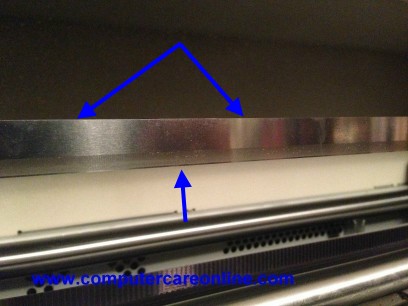
&lt;p&gt;&lt;strong&gt;&lt;a href=&quot;http://www.computercareonline.com/encoder-strip-c-193_195.html&quot; target=_blank&gt;The encoder strip, long shiny metal band that runs end to end of the plotter&lt;/a&gt;&lt;/strong&gt;, the carriage follows this strip. It is used to assist the plotter in locating the carriage assembly along its path.  The encoder strip in essence lets the carriage tell the electronics module where it is over the paper or in the ends of the plotter.&lt;/p&gt;

&lt;a href=&quot;http://www.designjetparts.com/blog/index.php/2014/06/12/designjet-plotter-encoder-strip-errors?blog=2#more64&quot;&gt;Read more &amp;raquo;&lt;/a&gt;&lt;div class=&quot;item_footer&quot;&gt;&lt;p&gt;&lt;small&gt;&lt;a href=&quot;http://www.designjetparts.com/blog/index.php/2014/06/12/designjet-plotter-encoder-strip-errors?blog=2&quot;&gt;Original post&lt;/a&gt; blogged on &lt;a href=&quot;http://b2evolution.net/&quot;&gt;b2evolution&lt;/a&gt;.&lt;/small&gt;&lt;/p&gt;&lt;/div&gt;</description>
	<content:encoded><![CDATA[<div class="socialbutttons"><div class="fbiframediv sharebuttton"><iframe src="http://www.facebook.com/plugins/like.php?app_id=194259500619894&amp;href=http://www.designjetparts.com/blog/index.php?p=64&amp;send=false&amp;layout=button_count&amp;width=450&amp;show_faces=false&amp;action=like&amp;colorscheme=light&amp;font=arial&amp;height=85" scrolling="no" frameborder="0" style="border:none; overflow:hidden; width:450px; height:85px;" allowTransparency="true"></iframe>&nbsp;&nbsp;</div><div class="twbutton sharebuttton"><a href="http://twitter.com/share" class="twitter-share-button" data-url="http://www.designjetparts.com/blog/index.php?p=64" data-count="horizontal" data-via="@computercareon">Tweet</a></div><div class="gplusdiv sharebuttton"><g:plusone size="medium" href="http://www.designjetparts.com/blog/index.php?p=64"></g:plusone></div></div><p><strong>Care and feeding of the HP DesignJet Plotter / Wide Format Printer Encoder strip.</strong></p>

<p><img src="http://www.designjetparts.com/blog/media/blogs/all/tech/750C_Encoder.jpg" alt="HP DesignJet Encoder Strip" title=" HP DesignJet Encoder Strip" /></p>

<p><strong><a href="http://www.computercareonline.com/encoder-strip-c-193_195.html" target=_blank>The encoder strip, long shiny metal band that runs end to end of the plotter</a></strong>, the carriage follows this strip. It is used to assist the plotter in locating the carriage assembly along its path.  The encoder strip in essence lets the carriage tell the electronics module where it is over the paper or in the ends of the plotter.</p>

<a href="http://www.designjetparts.com/blog/index.php/2014/06/12/designjet-plotter-encoder-strip-errors?blog=2#more64">Read more &raquo;</a><div class="item_footer"><p><small><a href="http://www.designjetparts.com/blog/index.php/2014/06/12/designjet-plotter-encoder-strip-errors?blog=2">Original post</a> blogged on <a href="http://b2evolution.net/">b2evolution</a>.</small></p></div>]]></content:encoded>
			</item>

<item rdf:about="http://www.designjetparts.com/blog/index.php/2014/05/21/mulit-roll-feeder-system-error?blog=2">
	<title>Designjet Multi Roll Feeder - TWI: System Error 0D0000, 0D0001, 0D0002, 0D0003</title>
	<link>http://www.designjetparts.com/blog/index.php/2014/05/21/mulit-roll-feeder-system-error?blog=2</link>
	<dc:date>2014-05-21T22:14:39Z</dc:date>	<dc:creator>Computer Care</dc:creator>
	<dc:subject>2000CP, 2500CP, 3000CP, 3500CP</dc:subject>
		<description>&lt;p&gt;&lt;a href=&quot;http://www.computercarefiles.com/TWI_Docs/bpp90166/default.html&quot;&gt;http://www.computercarefiles.com/TWI_Docs/bpp90166/default.html&lt;/a&gt;&lt;/p&gt;&lt;div class=&quot;socialbutttons&quot;&gt;&lt;div class=&quot;fbiframediv sharebuttton&quot;&gt;&lt;iframe src=&quot;http://www.facebook.com/plugins/like.php?app_id=194259500619894&amp;amp;href=http://www.designjetparts.com/blog/index.php?p=62&amp;amp;send=false&amp;amp;layout=button_count&amp;amp;width=450&amp;amp;show_faces=false&amp;amp;action=like&amp;amp;colorscheme=light&amp;amp;font=arial&amp;amp;height=85&quot; scrolling=&quot;no&quot; frameborder=&quot;0&quot; style=&quot;border:none; overflow:hidden; width:450px; height:85px;&quot; allowTransparency=&quot;true&quot;&gt;&lt;/iframe&gt;&amp;nbsp;&amp;nbsp;&lt;/div&gt;&lt;div class=&quot;twbutton sharebuttton&quot;&gt;&lt;a href=&quot;http://twitter.com/share&quot; class=&quot;twitter-share-button&quot; data-url=&quot;http://www.designjetparts.com/blog/index.php?p=62&quot; data-count=&quot;horizontal&quot; data-via=&quot;@computercareon&quot;&gt;Tweet&lt;/a&gt;&lt;/div&gt;&lt;div class=&quot;gplusdiv sharebuttton&quot;&gt;&lt;g:plusone size=&quot;medium&quot; href=&quot;http://www.designjetparts.com/blog/index.php?p=62&quot;&gt;&lt;/g:plusone&gt;&lt;/div&gt;&lt;/div&gt;&lt;h1&gt;&lt;a name=&quot;P-1_0&quot;&gt;&lt;/a&gt;&lt;span style=&quot;font-family: Arial; font-size: large;&quot;&gt;HP Designjet Multi Roll Feeder - TWI: System Error 0D0000&lt;br /&gt;0D0001, 0D0002, 0D0003&lt;/span&gt;&lt;/h1&gt;
&lt;p align=&quot;left&quot;&gt;&lt;span style=&quot;font-family: Arial; font-size: x-small;&quot;&gt;A problem with &lt;a href=&quot;http://www.computercareonline.com/c2394-60021-designjet-1000-series-mulitroll-feeder-channel-sensor-p-910.html&quot; target=&quot;_blank&quot;&gt;Channel sensor&lt;/a&gt; 1 has been detected. Most common causes are poor cable connections, incorrect sensor positioning, a faulty &lt;a href=&quot;http://www.computercareonline.com/c2394-60021-designjet-1000-series-mulitroll-feeder-channel-sensor-p-910.html&quot; target=&quot;_blank&quot;&gt;Channel sensor&lt;/a&gt; or Electronics module. Follow the steps listed below to determine the actual cause of the failure and to replace the appropriate parts. Error Codes 0D0001 refers to Channel 2 Sensor, 0D0002 refers to Channel 3 Sensor, 0D0003 refers to Channel 4 Sensor&lt;/span&gt;&lt;/p&gt;
&lt;h2&gt;&lt;a name=&quot;P6_415&quot;&gt;&lt;/a&gt;&lt;strong&gt;&lt;span style=&quot;font-family: Arial; font-size: medium;&quot;&gt;Parts required (part numbers are subject to change)&lt;/span&gt;&lt;/strong&gt;&lt;a href=&quot;/blog/#TopOfPage&quot;&gt;&lt;/a&gt;&lt;/h2&gt;
&lt;p&gt;
&lt;table border=&quot;1&quot; bgcolor=&quot;#ffffff&quot; bordercolor=&quot;#ffffff&quot;&gt;
&lt;tbody&gt;
&lt;tr&gt;
&lt;th width=&quot;188&quot; align=&quot;left&quot; valign=&quot;top&quot; scope=&quot;COL&quot;&gt;
&lt;p&gt;&lt;strong&gt;&lt;span style=&quot;font-family: Arial; font-size: x-small;&quot;&gt;Part description&lt;/span&gt;&lt;/strong&gt;&lt;/p&gt;
&lt;/th&gt;&lt;th width=&quot;107&quot; align=&quot;left&quot; valign=&quot;top&quot; scope=&quot;COL&quot;&gt;
&lt;p&gt;&lt;strong&gt;&lt;span style=&quot;font-family: Arial; font-size: x-small;&quot;&gt;Part number&lt;/span&gt;&lt;/strong&gt;&lt;/p&gt;
&lt;/th&gt;
&lt;/tr&gt;
&lt;tr&gt;
&lt;td width=&quot;188&quot; valign=&quot;top&quot; bgcolor=&quot;#f5f5f5&quot;&gt;
&lt;p&gt;&lt;span style=&quot;font-family: Arial; font-size: x-small;&quot;&gt;&lt;a href=&quot;/blog/http/www.computercareonline.com/c2394-60021-designjet-1000-series-mulitroll-feeder-channel-sensor-p-910.html&quot; target=&quot;_blank&quot;&gt;Channel Sensor &lt;/a&gt;(Required)&lt;/span&gt;&lt;/p&gt;
&lt;/td&gt;
&lt;td width=&quot;107&quot; valign=&quot;top&quot; bgcolor=&quot;#f5f5f5&quot;&gt;
&lt;p&gt;&lt;span style=&quot;font-family: Arial; font-size: x-small;&quot;&gt;&lt;a href=&quot;http://www.computercareonline.com/c2394-60021-designjet-1000-series-mulitroll-feeder-channel-sensor-p-910.html&quot;&gt;C2394-60021&lt;/a&gt;&lt;/span&gt;&lt;/p&gt;
&lt;/td&gt;
&lt;/tr&gt;
&lt;tr&gt;
&lt;td width=&quot;188&quot; valign=&quot;top&quot; bgcolor=&quot;#f5f5f5&quot;&gt;
&lt;p&gt;&lt;span style=&quot;font-family: Arial; font-size: x-small;&quot;&gt;Main PCA (Required)&lt;/span&gt;&lt;/p&gt;
&lt;/td&gt;
&lt;td width=&quot;107&quot; valign=&quot;top&quot; bgcolor=&quot;#f5f5f5&quot;&gt;
&lt;p&gt;&lt;span style=&quot;font-family: Arial; font-size: x-small;&quot;&gt;C2394-69002&lt;/span&gt;&lt;/p&gt;
&lt;/td&gt;
&lt;/tr&gt;
&lt;/tbody&gt;
&lt;/table&gt;
&lt;/p&gt;
&lt;p align=&quot;left&quot;&gt;&lt;span style=&quot;font-family: Arial; font-size: x-small;&quot;&gt;If any of the troubleshooting steps listed below solve the problem, attempt to verify printer functionality by printing several internal prints. If functionality is verified, no additional parts should be replaced. (To troubleshoot Error Codes - 0D0001, 0D0002, 0D0003 follow the same steps but substitute the corresponding channel sensor 01 - CH2, 02-CH3 &amp;amp; 03-CH4).&lt;/span&gt;&lt;/p&gt;
&lt;p&gt;
&lt;p&gt;&amp;#194;&amp;#160;&lt;/p&gt;
&lt;a href=&quot;http://www.designjetparts.com/blog/index.php/2014/05/21/mulit-roll-feeder-system-error?blog=2#more62&quot;&gt;Read more &amp;raquo;&lt;/a&gt;&lt;div class=&quot;item_footer&quot;&gt;&lt;p&gt;&lt;small&gt;&lt;a href=&quot;http://www.designjetparts.com/blog/index.php/2014/05/21/mulit-roll-feeder-system-error?blog=2&quot;&gt;Original post&lt;/a&gt; blogged on &lt;a href=&quot;http://b2evolution.net/&quot;&gt;b2evolution&lt;/a&gt;.&lt;/small&gt;&lt;/p&gt;&lt;/div&gt;</description>
	<content:encoded><![CDATA[<p><a href="http://www.computercarefiles.com/TWI_Docs/bpp90166/default.html">http://www.computercarefiles.com/TWI_Docs/bpp90166/default.html</a></p><div class="socialbutttons"><div class="fbiframediv sharebuttton"><iframe src="http://www.facebook.com/plugins/like.php?app_id=194259500619894&amp;href=http://www.designjetparts.com/blog/index.php?p=62&amp;send=false&amp;layout=button_count&amp;width=450&amp;show_faces=false&amp;action=like&amp;colorscheme=light&amp;font=arial&amp;height=85" scrolling="no" frameborder="0" style="border:none; overflow:hidden; width:450px; height:85px;" allowTransparency="true"></iframe>&nbsp;&nbsp;</div><div class="twbutton sharebuttton"><a href="http://twitter.com/share" class="twitter-share-button" data-url="http://www.designjetparts.com/blog/index.php?p=62" data-count="horizontal" data-via="@computercareon">Tweet</a></div><div class="gplusdiv sharebuttton"><g:plusone size="medium" href="http://www.designjetparts.com/blog/index.php?p=62"></g:plusone></div></div><h1><a name="P-1_0"></a><span style="font-family: Arial; font-size: large;">HP Designjet Multi Roll Feeder - TWI: System Error 0D0000<br />0D0001, 0D0002, 0D0003</span></h1>
<p align="left"><span style="font-family: Arial; font-size: x-small;">A problem with <a href="http://www.computercareonline.com/c2394-60021-designjet-1000-series-mulitroll-feeder-channel-sensor-p-910.html" target="_blank">Channel sensor</a> 1 has been detected. Most common causes are poor cable connections, incorrect sensor positioning, a faulty <a href="http://www.computercareonline.com/c2394-60021-designjet-1000-series-mulitroll-feeder-channel-sensor-p-910.html" target="_blank">Channel sensor</a> or Electronics module. Follow the steps listed below to determine the actual cause of the failure and to replace the appropriate parts. Error Codes 0D0001 refers to Channel 2 Sensor, 0D0002 refers to Channel 3 Sensor, 0D0003 refers to Channel 4 Sensor</span></p>
<h2><a name="P6_415"></a><strong><span style="font-family: Arial; font-size: medium;">Parts required (part numbers are subject to change)</span></strong><a href="http://www.designjetparts.com/blog/#TopOfPage"></a></h2>
<p>
<table border="1" bgcolor="#ffffff" bordercolor="#ffffff">
<tbody>
<tr>
<th width="188" align="left" valign="top" scope="COL">
<p><strong><span style="font-family: Arial; font-size: x-small;">Part description</span></strong></p>
</th><th width="107" align="left" valign="top" scope="COL">
<p><strong><span style="font-family: Arial; font-size: x-small;">Part number</span></strong></p>
</th>
</tr>
<tr>
<td width="188" valign="top" bgcolor="#f5f5f5">
<p><span style="font-family: Arial; font-size: x-small;"><a href="http://www.designjetparts.com/blog/http/www.computercareonline.com/c2394-60021-designjet-1000-series-mulitroll-feeder-channel-sensor-p-910.html" target="_blank">Channel Sensor </a>(Required)</span></p>
</td>
<td width="107" valign="top" bgcolor="#f5f5f5">
<p><span style="font-family: Arial; font-size: x-small;"><a href="http://www.computercareonline.com/c2394-60021-designjet-1000-series-mulitroll-feeder-channel-sensor-p-910.html">C2394-60021</a></span></p>
</td>
</tr>
<tr>
<td width="188" valign="top" bgcolor="#f5f5f5">
<p><span style="font-family: Arial; font-size: x-small;">Main PCA (Required)</span></p>
</td>
<td width="107" valign="top" bgcolor="#f5f5f5">
<p><span style="font-family: Arial; font-size: x-small;">C2394-69002</span></p>
</td>
</tr>
</tbody>
</table>
</p>
<p align="left"><span style="font-family: Arial; font-size: x-small;">If any of the troubleshooting steps listed below solve the problem, attempt to verify printer functionality by printing several internal prints. If functionality is verified, no additional parts should be replaced. (To troubleshoot Error Codes - 0D0001, 0D0002, 0D0003 follow the same steps but substitute the corresponding channel sensor 01 - CH2, 02-CH3 &amp; 03-CH4).</span></p>
<p>
<p>&#194;&#160;</p>
<a href="http://www.designjetparts.com/blog/index.php/2014/05/21/mulit-roll-feeder-system-error?blog=2#more62">Read more &raquo;</a><div class="item_footer"><p><small><a href="http://www.designjetparts.com/blog/index.php/2014/05/21/mulit-roll-feeder-system-error?blog=2">Original post</a> blogged on <a href="http://b2evolution.net/">b2evolution</a>.</small></p></div>]]></content:encoded>
			</item>
</rdf:RDF>